Game Friend DS
User Manual
Overview
Game Friend DS is an ML-powered real-time phoneme detector and clip-gain attenuator. It intelligently detects and tames harsh consonants including sibilants, plosives, fricatives, and affricates.
Clip-gain is the gold-standard for professional de-essing which involves manually isolating and attenuating problematic phonemes. Game Friend DS automates this workflow by using a trained neural network so you get transparent surgical results without the tedium.
Formats: AU / VST3 — macOS & Windows
Interface
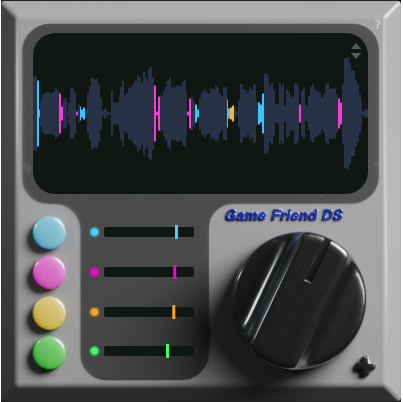
Main panel
- Waveform Display: The dark recessed screen shows your audio in real time, color-coded by detected phoneme type.
- Phoneme Buttons: Four color-coded buttons on the left toggle each phoneme category on/off.
- GR Bars: Gain reduction meters next to each button show attenuation depth in real time. Drag the bars to set max gain reduction.
- Threshold Knob: The large black knob sets the volume level that activates phoneme detection (-60 to 0 dB). Audio below this level is ignored. Note: the threshold is not absolute; it is perceptually weighted per phoneme category, so each type triggers according to percieved loudness rather than its raw level.
- ? Button: Opens the in-plugin help overlay (see below).
Extended Panel
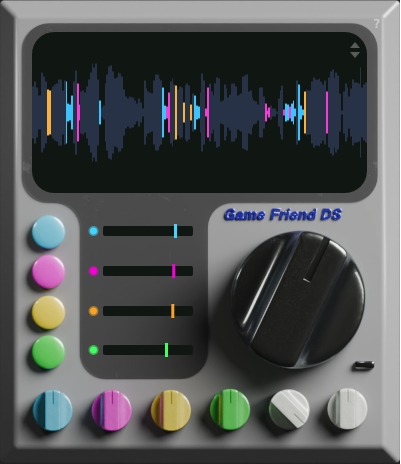
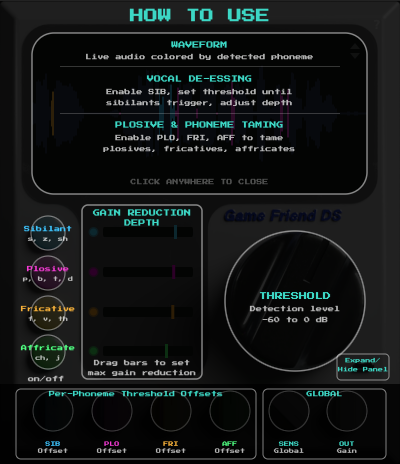
Click the ? button at the top right to see the help overlay
Click the "start" button at the bottom right to reveal six additional knobs for fine-tuning:
Individual phoneme offsets are relative to the main threshold knob.
- SIB Offset: Threshold offset for sibilants (-12 to +12 dB)
- PLO Offset: Threshold offset for plosives (-12 to +12 dB)
- FRI Offset: Threshold offset for fricatives (-12 to +12 dB)
- AFF Offset: Threshold offset for affricates (-12 to +12 dB)
- Sensitivity: Controls how confident the ML model needs to be before triggering gain reduction. Lower values = fewer false triggers, higher values = more aggressive detection (0–100%)
- Output Gain: Post-processing level adjustment (-12 to +12 dB)
Phoneme Categories
Game Friend DS classifies potentially offensive vocals into four phoneme categories each with its own color, toggle, and gain reduction depth:
Sibilants (SIB)
s, z, sh
The classic de-essing target i.e. hissing and sharp "s" sounds that can cause listening fatigue and produce harsh resonances.
Plosives (PLO)
p, b, t, d
Burst-like consonants that cause mic pops and low-frequency thumps, especially on close-miked vocals.
Fricatives (FRI)
f, v, th
Breathy, noise consonants created by turbulent airflow. Usually more subtle than sibilants but "V" sounds still drive me crazy.
Affricates (AFF)
ch, j
A combination of a plosive burst followed by a fricative release. These can be surprisingly harsh and are often overlooked by traditional de-essers.
Quick Start
- Insert Game Friend DS on your vocal channel.
- Set the threshold using the black knob. Lower values detect quieter phonemes; start around -19 dB (the default) and adjust from there.
- Toggle phoneme categories to focus on the problems you hear. For basic de-essing, you may only need SIB enabled.
- Adjust attenuation depth by dragging the GR bars. The default -6 dB. Listen for the taming/smoothing of sibilants/plosives without the vocal losing its natural character.
- Fine-tune with the controlls in the extended panel if needed. Per-category offsets allow you to change the threshold of a particular phoneme irrespective of the others.
Tips
- Use the waveform scale arrows (up/down at the top right of the screen) to resize the waveform display for comfortable visual monitoring.
- Start with just SIB enabled. Add PLO if you hear plosive pops that weren't caught by the pop filter, and AFF if "V" sounds also stand out too much.
- For podcasts and voiceover, try enabling all four categories with gentle reduction (-3 to -6 dB) for a polished, broadcast-ready sound.
- The per-category offsets in the extended panel are useful when one phoneme type triggers too easily or not easily enough relative to the others.
- Game Friend DS works best early in your vocal chain, before compression, EQ, and effects, just like manual clip-gain editing.
Installation
macOS
Run the .pkg installer. Plugins are installed to:
~/Library/Audio/Plug-Ins/Components/(AU)~/Library/Audio/Plug-Ins/VST3/(VST3)
Windows
Run the .exe installer. The VST3 plugin is installed to:
C:\Program Files\Common Files\VST3\(VST3)
License & Trial
Game Friend DS includes a free 7-day trial. During the trial, the plugin is fully functional with no limitations.
After purchasing, you'll receive a license key in your confirmation email and on the downloads page. Enter it in the splash screen that appears when the trial has expired (or on first launch) to activate the plugin.
System Requirements
- macOS 10.15 (Catalina) or later
- Windows 10 or later
- VST3 or AU compatible DAW
- 64-bit only
- Latency: 70ms (look-ahead buffer for transparent processing)